
No, this isn’t a joke, iTrent have implemented changes on April 1st and your co-workers will be asking questions about it.
Read on to hear what happens if a user forgets this vital information and about the planned 2026 changes, or speak to Kazzicom for queries related to memorable passwords, MFA and all things iTrent..

From 1st April 2025, alongside a username and password, an additional memorable password will need to be set up when a user first logs into iTrent. It must be different to the users main password, and this will be checked when the memorable password is set up. (see left)
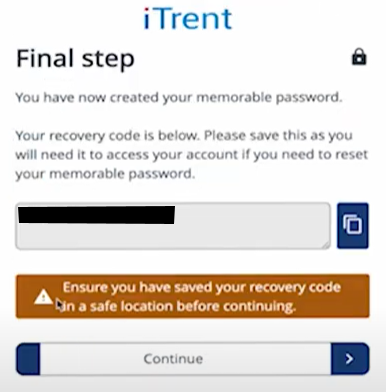
The user will then be presented with confirmation that they have created their memorable password, and provided with a recovery code which they should keep safe, as they can use it to reset their memorable password. (see below)
When the user next logs in with their username and password, they will then be asked to enter 3 random characters from their memorable password. (see right)
If the user has forgotten their memorable password, they can click the “Forgotten memorable password” button on this screen and enter their recovery code. They will then be able to create a new memorable password before being issued a new recovery code to use in the event that they forget their memorable password again.
If the user has forgotten their memorable password as well as their recovery code, a System Administrator can assist with the reset.

From 1st April 2026, the minimum-security standard changes again, to Multi-Factor Authentication (MFA).
Need help or want to move to MFA before the 1st April 2026 deadline? Kazzicom are available to assist with queries related to memorable passwords, MFA and all things iTrent.
email sales@kazzicom.com or phone 0800 0 2747 51 to speak to a team member today